


Posts tagged ‘software’
iPhone Tethering Telstra NextG How To Set Up
If your with telstra next G and you want to tether with your new iphone 3.0 Software heres how to do it.
If your on a telstra iphone plan goto this link: http://bit.ly/telstra-iph
If your on a general plan and have bought a data pack or what to pay as you go you can use this link: http://bit.ly/telstra-inet
Let me know how you go
 Follow
Does Freagle Work?
I’ve just started another blog. Yep don’t you know it.
Check it HERE
Last night on Today Tonight, a popular TV show on channel 7, a money making scheme was shown called Freagle.
Shown as the “Easiest Home Business Ever”, Today Tonight presented this story, interviewing people who have had major success using the program and the two of the site owners. Some would say the site has just paid some big bucks and used the today tonight as a big ad campaign for their money making program. I’m not going to discuss that part but if your interested, head over to this blog where its currently being discussed.
The site http://www.easiesthomebusinessever.com.au is a monthly subscription program you can sign up to and they claim that using the program you can earn over $100 an hour following the simple tutorials and using their in house software called Freagle. Freagle also owns other companies such as Freestuffday & Layby.
Ok, So What’s This Site All About?
Does Freagle Work is me going through the program blogging about every aspect of it. I’m going to see if you really can make money from it and then help you do it in the process. If it doesn’t work. I’m going to spam the blog all over the net and make sure people don’t give these creeps any more money :)
Make Portable Thunderbird You Default Mail Client
I constantly recommend portable apps to clients as they are the easiest to backup compared to outlook and other programs.
The only problem is that they struggle to work as a default mail client as they are portable. Here is a hack which solves this problem and makes everything work nice and smoothly.
Copy and paste the code below into a .reg file, then edit the path to match your TBP installation.
Works on Win XP SP3, Vista, Windows 7
=== start .reg code ===
Windows Registry Editor Version 5.00
; Changes to make TB Portable the default e-mail client
; Make your TB Portable the default mail client: Tools > Options. Don’t skip this step.
; Edit YOUR ThunderbirdPortable.exe path below. MINE is E:\\Program Files\\ThunderbirdPortable\\ThunderbirdPortable.exe
; Run this patch and you are done.
[HKEY_LOCAL_MACHINE\SOFTWARE\Clients\Mail\Mozilla Thunderbird\shell\open\command]
@="\"E:\\Program Files\\ThunderbirdPortable\\ThunderbirdPortable.exe\" -mail"
[HKEY_LOCAL_MACHINE\SOFTWARE\Clients\Mail\Mozilla Thunderbird\shell\properties]
@="Thunderbird &Options"
[HKEY_LOCAL_MACHINE\SOFTWARE\Clients\Mail\Mozilla Thunderbird\shell\properties\command]
@="\"E:\\Program Files\\ThunderbirdPortable\\ThunderbirdPortable.exe\" -options"
[HKEY_LOCAL_MACHINE\SOFTWARE\Classes\mailto\DefaultIcon]
@="E:\\Program Files\\ThunderbirdPortable\\App\\thunderbird\\thunderbird.exe,0"
[HKEY_LOCAL_MACHINE\SOFTWARE\Classes\mailto\shell\open\command]
@="\"E:\\Program Files\\ThunderbirdPortable\\ThunderbirdPortable.exe\" \"%1\""
[HKEY_LOCAL_MACHINE\SOFTWARE\Clients\Mail]
@="Mozilla Thunderbird"
; This fixes MAPI
[HKEY_LOCAL_MACHINE\SOFTWARE\Classes\CLSID\{29F458BE-8866-11D5-A3DD-00B0D0F3BAA7}\LocalServer32]
@="E:\\Program Files\\ThunderbirdPortable\\ThunderbirdPortable.exe /MAPIStartUp"
=== end .reg code ===
Koorong 20% Off Sale | All Stock 26 Feb – 3 Mar
Great deals to be had @ koorong!
Grab a bargain or two during Koorong’s massive 5-day sale!
From Thursday 26th February to Tuesday 3rd March, you’ll save 20% off all books, Bibles, CDs, DVDs, gifts, software . everything in stock.*
Please note that Koorong Mt. Lawley will be closed on the Labour Day public holiday Monday 2nd March.
Also free postage for orders $125 or more.
Nokia N97 Set To Release Late March 09
Remember how I told you about the new iPhone killer back in 08? Well its not far away with the Nokia N97 being released in late march.
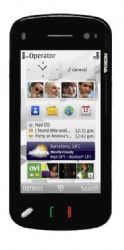 This amazing phone has these features which flogs the iPhone out of the water.
- 3.5” Touchscreen
- Full Qwerty Keyboard
- 32GB Internal Memory
- 16gb Expandable SD slot.
- 5MP Camera
- GPS Software
- A long 430 hours standby, 6.5 Hours Talk time & 37 Hours Music Playback!
With these features a hefty price tags come though, around $1250AU ($800US)
Click HERE for Nokias Tech Specs and check out the amazing hands on video below:
RSS Part 2 – Engaging With RSS Feeds
Now that you know what RSS is, time to learn how to start engaging with it and using software to subscribe to RSS feeds.
There are three types of software that you can use to subscribe to RSS Feeds
- Browser Integration (My Favourite)
- Online Software
- Offline Software
What solution is right for me?
1. Browser Integration is best for people surfing the net all the time, who want to keep right up to date with their RSS and like it all in one neat bundle.
2. Offline software is best for people who aren’t the biggest fans of RSS and only want to check for updates now and then, or who are busy and don’t want to be distracted by updates when they have free time. (Probably best for work lunch breaks)
3. Online Software is best for people who want to view their feeds right around the globe from any computer there on, great for people traveling.
NOTE: Options 1 & 2 with certain programs can sync with online solutions which may be another option for keen RSS’ers
Ok, now which software and how do I use it?
1. Flock is the best Browser with RSS Feed integration (Windows). Click here for flock reviewed. How to add a RSS feed with flock:
When a feed has been detected in flock, the rss icon will glow orange next to the address bar.
 When you your feeds have a new content, the rss icon on the flock toolbar will glow orange, click it and your feeds are displayed.
There are many other cool social web features that flock offers as well, for tutorials and information, type “about:flock” into your address bar.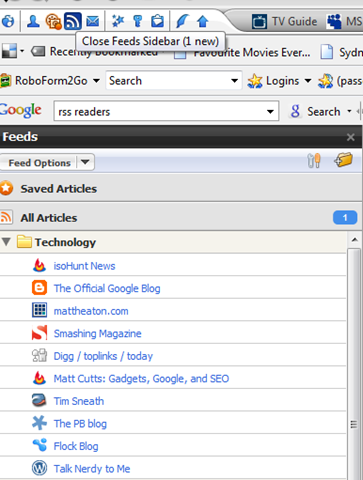
You can change in flocks options how often to check for new feeds as well.
Other Software:
- Opera – Click here for tutorial.(Recommended for all other operating systems)
2. Google Reader has been rated the best online feed software. Some advantages include mobile compatibility and many plugins that work with operating systems and software, designed by google themselves.
Sign in or sign up if you don’t have a google account and start adding feeds, or watch this easy tutorial video from youtube.
Other Software:
3. Feed Reader 3 is a great offline RSS Reader. Similar to google reader in features but in a separate offline software package.
Other Software:
What do you use? Have i missed any software solutions? Is there anything else about RSS you would like to know? Please let me know…