


New Vodafone Network | Central Coast | February Real Time Data Results.
I currently have optus and vodafone for the next 30 days which i will be doing some test for internet speed and coverage tests. This page will be updated as I do more.
All tests were done on Identical galaxy S2 Phones.
| Test Number | Time | Location | Carrier | Reception | Ping | Download (mb/s) | Upload (mb/s) |
|---|---|---|---|---|---|---|---|
| 1 | Tuesday 5:15pm | Racecourse Road, Gosford | Vodafone | 4 | 164 | 2.40 | 0.54 |
| 1 | Tuesday 5:15pm | Racecourse Road, Gosford | Optus | 4 | 89 | 0.81 | 0.44 |
| 2 | Tuesday 5.30pm | Beane St, Gosford | Vodafone | 3 | 109 | 0.95 | 1.38 |
| 2 | Tuesday 5.30pm | Beane St, Gosford | Optus | 3 | 97 | 0.39 | 0.40 |
| 3 | Tuesday 6.30pm | Beane St, Gosford (Surrounded by bricks) | Vodafone | 1 | 120 | 0.23 | 0.3 |
| 3 | Tuesday 6.30pm | Beane St, Gosford (Surrounded by bricks) | Optus | 1 | 112 | 0.41 | 0.81 |
| 4 | Tuesday 8:00pm | Beane St, Gosford | Vodafone | 4 | 248 | 0.20 | 0.08 |
| 4 | Tuesday 8:00pm | Beane St, Gosford | Optus | 4 | 115 | 1.07 | 0.59 |
| 5 | Tuesday 9:30pm | Beane St, Gosford | Vodafone | 4 | 146 | 0.40 | 0.10 |
| 5 | Tuesday 9:30pm | Beane St, Gosford | Optus | 4 | 94 | 1.15 | 0.59 |
| 6 | Tuesday 10:30pm | Beane St, Gosford | Vodafone | 4 | 87 | 1.85 | 1.40 |
| 6 | Tuesday 10:30pm | Beane St, Gosford | Optus | 4 | 111 | 1.13 | 0.65 |
| 7 | Tuesday 11:30pm | Beane St, Gosford | Vodafone | 4 | 76 | 3.04 | 1.64 |
| 7 | Tuesday 11:30pm | Beane St, Gosford | Optus | 4 | 110 | 1.30 | 0.57 |
| 8 | Wednesday 7.30am | Beane St, Gosford | Vodafone | 4 | 85 | 3.60 | 1.58 |
| 9 | Wednesday 7.30am | Beane St, Gosford | Optus | 4 | 114 | 1.03 | 0.61 |
| 10 | Wednesday 8.30am | Racecourse Road, Gosford | Vodafone | 4 | 83 | 2.41 | 1.17 |
| 10 | Wednesday 8.30am | Racecourse Road, Gosford | Optus | 4 | 103 | 0.59 | 0.69 |
| 11 | Wednesday 9.30am | Racecourse Road, Gosford | Vodafone | 4 | 147 | 3.41 | 1.12 |
| 11 | Wednesday 9.30am | Racecourse Road, Gosford | Optus | 4 | 81 | 1.50 | 0.53 |
| 13 | Wednesday 11.45am | Lot 41 Bundaleer Crescent, Bensville NSW | Vodafone | 4 | 131 | 0.98 | 0.93 |
| 13 | Wednesday 11.45am | Lot 41 Bundaleer Crescent, Bensville NSW | Optus | 4 | 89 | 0.75 | 0.52 |
| 14 | Wednesday 2.00pm | Racecourse Road, Gosford | Vodafone | 4 | 144 | 2.77 | 0.63 |
| 14 | Wednesday 2.00pm | Racecourse Road, Gosford | Optus | 4 | 101 | 1.11 | 0.70 |
| 15 | Wednesday 2.30pm | Toyota, Wyoming | Vodafone | 4 | 198 | 0.97 | 0.17 |
| 15 | Wednesday 2.30pm | Toyota, Wyoming | Optus | 4 | 99 | 0.76 | 0.53 |
| 16 | Wednesday 2.35pm | Lisarow Shops | Vodafone | 4 | 78 | 4.76 | 1.39 |
| 16 | Wednesday 2.35pm | Lisarow Shops | Optus | 4 | 104 | 1.10 | 0.52 |
| 17 | Wednesday 3.00pm | Ourimbah University | Vodafone | 4 | 96 | 3.23 | 1.32 |
| 17 | Wednesday 3:00pm | Ourimbah University | Optus | 3 | 100 | 0.96 | 0.53 |
| 18 | Wednesday 4:00pm | Ourimbah University, South Class Room | Vodafone | 1 | 92 | 1.78 | 0.55 |
| 18 | Wednesday 4:00pm | Ourimbah University, South Class Room | Optus | G Reception | 675 | 0.03 | 0.04 |
| 19 | Wednesday 5:00pm | Ridgeway Road, Tumbi Umbi | Vodafone | 4 | 927 | 0.27 | 0.92 |
| 19 | Wednesday 5:00pm | Ridgeway Road, Tumbi Umbi | Optus | 4 | 157 | 1.13 | 0.36 |
| 20 | Wednesday 6:30pm | Erina, Major Traffic Light Intersection | Vodafone | 4 | 160 | 2.30 | 1.00 |
| 20 | Wednesday 6:30pm | Erina, Major Traffic Light Intersection | Optus | 4 | 113 | 0.45 | 0.51 |
| 21 | Wednesday 8.30pm | Beane St, Gosford | Vodafone | 4 | 166 | 0.42 | 0.05 |
| 21 | Wednesday 8.30pm | Beane St, Gosford | Optus | 4 | 99 | 1.92 | 0.56 |
| 22 | Wednesday 10.15pm | Beane St, Gosford | Vodafone | 2 | 106 | 0.74 | 1.40 |
| 22 | Wednesday 10.15pm | Beane St, Gosford | Optus | 2 | 92 | 1.56 | 0.45 |
| 23 | Thursday 7.30am | Beane St, Gosford | Vodafone | 4 | 76 | 1.60 | 0.37 |
| 23 | Thursday 7.30am | Beane St, Gosford | Optus | 4 | 130 | 1.47 | 0.67 |
| 24 | Thursday 12.45pm | West Gosford Shopping Centre | Vodafone | 4 | 151 | 2.94 | 1.12 |
| 24 | Thursday 12.45pm | West Gosford Shopping Centre | Optus | 4 | 80 | 0.39 | 0.19 |
| 25 | Thursday 4.15pm | Racecourse Road, Gosford | Vodafone | 4 | 135 | 2.92 | 0.85 |
| 25 | Thursday 4.15pm | Racecourse Road, Gosford | Optus | 4 | 90 | 1.27 | 0.54 |
| 26 | Friday 10.30pm | EV Church, Erina | Vodafone | 4 | 155 | 1.18 | 1.29 |
| 26 | Friday 10.30pm | EV Church, Erina | Optus | 4 | 92 | 0.08 | 0.06 |
| 27 | Wednesday 9:00am | Racecourse Road, Gosford | Vodafone | 4 | 138 | 3.67 | 1.02 |
| 27 | Wednesday 9:00am | Racecourse Road, Gosford | Optus | 4 | 77 | 2.03 | 0.75 |
| 28 | Wednesday 11:45am | Racecourse Road, Gosford | Vodafone | 4 | 143 | 3.33 | 1.5 |
| 28 | Wednesday 11:45am | Racecourse Road, Gosford | Optus | 4 | 158 | 1.20 | 0.40 |
| 29 | Wednesday 1:00pm | Racecourse Road, Gosford | Vodafone | 4 | 85 | 1.35 | 0.66 |
| 29 | Wednesday 1:00pm | Racecourse Road, Gosford | Optus | 4 | 136 | 1.49 | 0.99 |
Notes:
Wednesday 29/2 – 12pm
Today i went for a drive from Gosford to Bensville and compared reception and data speeds the whole way. Reception was nearly exactly the same, 0-4 Bars. both services were a bit patchy going up and down the hill past Greeen Point Christian School, but as soon as i reach Kincumber shops all was fine. I was on a call the whole way and had no drop outs as well. Optus outperformed Vodafone (data speed wise) in 80% of speed tests along the way (probably did about 15 tests along the route), but once at a particular standing still location, Vodafone seemed to have better speeds.
Wednesday 29/2 – 5pm
I went for a drive from Ourimbah along Fagons road, then across the ridgeway towards Tumbi. Usually Optus drops out along 3 points along the Ridgeway, and so did Vodafone. Reception was very similar along this whole road, except for when vodafone did have reception, it did have H reception, Optus only had E or G. Vodafone has a new tower going in at Mount Elliot later this year, hopefully these blackspots will be fixed then.
Wednesday 29/2 – 6.30pm
I went for a drive from Tumbi Umbi, over the ridgeway and through Holgate back to Gosford via Erina. Vodafones reception along Ridgeway through Holdate was actually slightly better than Optus’s, had full bars where Optus had none or only 1 at a few spots. The biggest difference was driving through Springfield, at one point Optus dropped out had no reception, and Vodafone had full bars at H speed all the way through. Vodafone wins in this part of town. Speeds were also 3x faster at 6.30pm.
 Follow
How To Widen MailChimp Body and Sidebar Newsletter
MailChimp: “MailChimp helps you design email newsletters, share them on social networks, integrate with services you already use, and track your results. It’s like your own personal publishing platform.”
Mail chimp templates seem to have a real problem with the width, and sometimes they are so skinny your emails that you send out can look stupid and ridiculous!
There is a easy fix to force it to widen, click on the edit button of the body or sidebar, then click source, and add the following code to the bottom of the page.
<img height="1" src="space.gif" width="500" />
Change the width to whatever you want and click save. Problem solved!
Automatically Shutdown Computer At Certain scheduled time
This tutorial will shutdown your computer at a certain time even if users are logged on or off and will check to make sure they aren’t still using it before it shutdowns.
- Create a .BAT File by opening up notepad and when you save as, select all files then name it shutdown.bat.

- Put the following text in the file “c:/shutdown.exe –s” and save it. When this .bat file is run it triggers the shutdown.exe file under windows and your computer will shutdown.
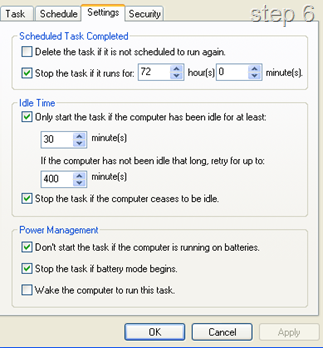
- Now to schedule it, open up Scheduled Tasks under control panel or task scheduler which it is known under vista/windows 7
- Add scheduled task, select the .bat file you have just made (i stored it in C drive), perform this task daily, start time 6PM, enter the administrator credentials and finish.
- Now double click the task and go to the settings tab. Under Idle Time, "only start this task if the computer has been idle for at least 30 minutes" and i also ticked the next box so it continues to check up until 12pm until the computer is idle.

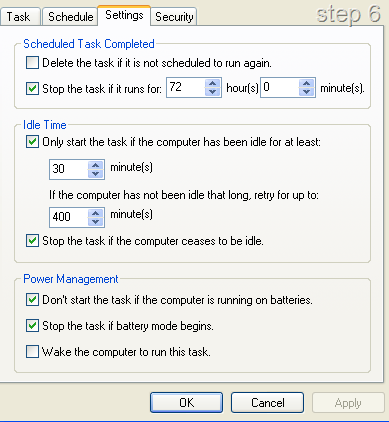
In my Workplace i did this on 5 computers, because the others have remote users, i worked out it saves $100 per computer/per year totalling a $500 saving per year.
Other Notes:
- You can also include various maintenance routines in this .bat file when it shutdowns. For example, mine cleans all temp files and runs a defrag on the local drive. To Implement this, install Crap Cleaner on the computer and add the following code to your .bat file.
“C:\Program Files\CCleaner\ccleaner.exe" /AUTO
defrag c: /f
c:/shutdown.exe –s”
Does Freagle Work?
I’ve just started another blog. Yep don’t you know it.
Check it HERE
Last night on Today Tonight, a popular TV show on channel 7, a money making scheme was shown called Freagle.
Shown as the “Easiest Home Business Ever”, Today Tonight presented this story, interviewing people who have had major success using the program and the two of the site owners. Some would say the site has just paid some big bucks and used the today tonight as a big ad campaign for their money making program. I’m not going to discuss that part but if your interested, head over to this blog where its currently being discussed.
The site http://www.easiesthomebusinessever.com.au is a monthly subscription program you can sign up to and they claim that using the program you can earn over $100 an hour following the simple tutorials and using their in house software called Freagle. Freagle also owns other companies such as Freestuffday & Layby.
Ok, So What’s This Site All About?
Does Freagle Work is me going through the program blogging about every aspect of it. I’m going to see if you really can make money from it and then help you do it in the process. If it doesn’t work. I’m going to spam the blog all over the net and make sure people don’t give these creeps any more money :)
Phaser Computers SEO Improvement
I’ve been looking at getting more clients and expanding my computer services business’s. I currently come up 2nd on the map with a google search but no where to be seen in the list of website pages.
I also noticed there isn’t much competition with computer services on the coast on google with all sites having low page ranks and not very good SEO techniques.
So i renamed alot of things and optimised some code and will be monitoring how it goes.
I’m also going to change the content on the site to be more streamline, the current wording and pages are boring and look like they were left from the template upon which the site was built.
Check out the Phaser Computers site HERE